Conversation tree navigation
/tree lets you go back to any earlier point in the conversation and continue
from there, keeping every branch. It opens a browser of the current conversation;
forking works while the agent is idle. This follows the user/assistant selection model of
pi-coding-agent's session tree.
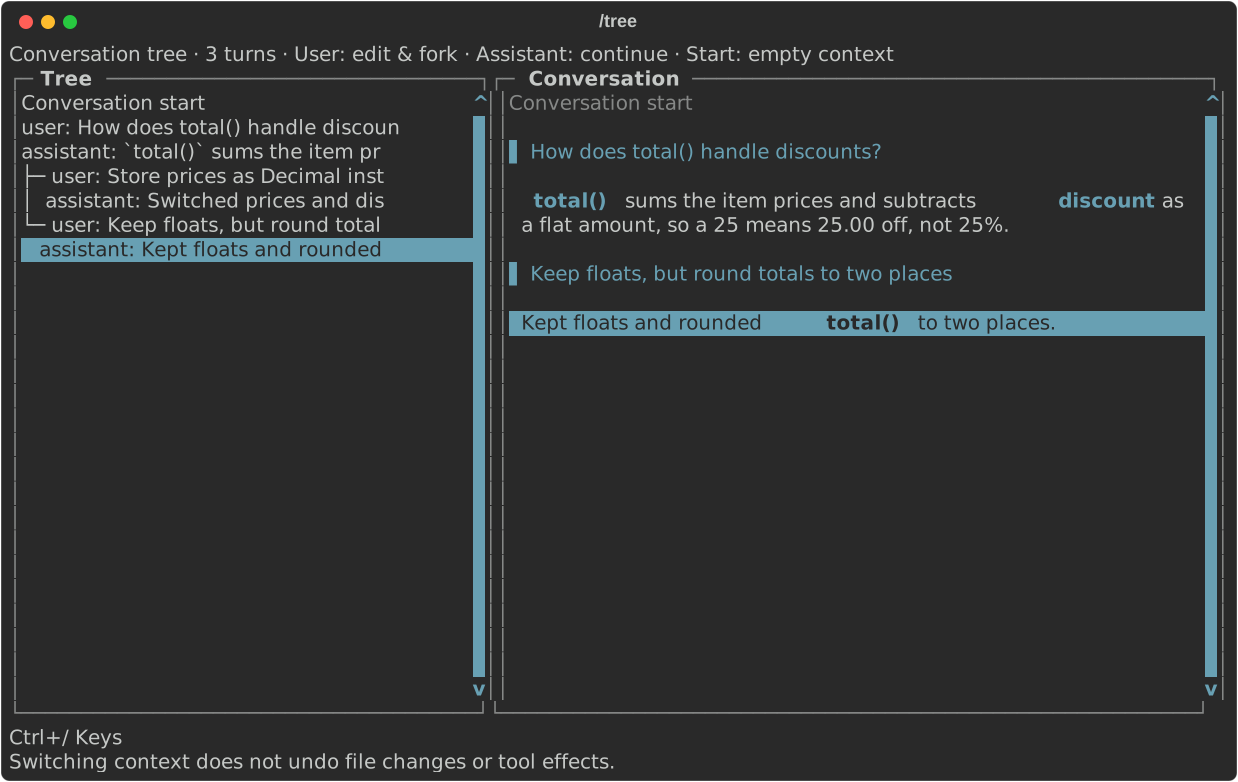
Ctrl+/ lists the picker's keys.
The picker is laid out like /resume: the tree on the left, and on the right a
Conversation pane showing the full branch through the selected row, root to
leaf. Moving the selection scrolls that pane so the selected prompt or response
sits at the top, with what led to it above and what followed below. Below a
selected row the pane follows the active branch where the tree forks.
- ↑ / ↓: move through the tree. PageUp / PageDown and Ctrl+U / Ctrl+D scroll through longer trees.
- Tab: focus the Conversation pane; ↑ / ↓, PageUp / PageDown, and Ctrl+U / Ctrl+D scroll it. Tab again returns to the tree.
- Enter on a user prompt: restore the context before that turn and place its original prompt in the editor. Edit and send it to create another branch.
- Enter on an assistant response: restore the context after that turn. Send a new message to continue from there.
- Enter on Conversation start: select empty context within the same session.
- Ctrl+Y: copy the selected prompt or response to the system clipboard, from
either pane (or your shortcut prefix, then
y, if you set one). It copies the text as the Conversation pane shows it (redacted, truncated at 64 KiB), and the header says what was copied. On a response holding quotes or fenced code blocks, it opens a picker like/copy's to copy one of those, or the whole response. - Escape / Ctrl+C: close the picker without changing context or the draft.
The picker starts on the active position, marked ← active. It shows every branch
in depth-first order. Messages on the same path stay aligned; indentation increases
only where the conversation splits into branches, not with every message or turn.
Existing descendants are never deleted when you select an ancestor or submit a
different continuation. For example:
Conversation start
user: Explain the failing test
assistant: The parser rejects empty input
├─ user: Fix the parser
│  assistant: Updated the parser
│  user: Run the tests
│  assistant: Tests pass
└─ user: Instead, change the test
   assistant: Updated the test ← active
Select either assistant response to return to that branch. Select either user
prompt to try another version. /tree itself makes no model requests and runs no
tools; it does not generate summaries of the branch you leave.
What changes when navigating
The model's history, the task plan, and what a resumed session replays all
follow the selected path, not the most recently written branch. /tools shows
calls on the selected path. The terminal transcript is redrawn for that path
(up to transcript_max_chars, as on resume and /redraw), so output from the
branch you left no longer appears. Usage and completed-turn counters remain
session totals, including other branches.
Navigation works at turn boundaries, not individual tool calls: a turn is your prompt plus everything the model did in response. Failed or interrupted turns are marked and continue from their last checkpoint (or from the turn before, if they have none). Navigation never replays tools or treats a tool call that never finished as completed.
Switching context does not undo file edits, shell commands, network requests, or other tool effects. All branches share the current workspace. If you need to restore files, use your version-control workflow separately. MCP enablement stays as currently configured; navigation does not reconnect disabled servers.
While a turn is running or prompts are queued, /tree opens read-only: the
header says read-only while working and Enter does not switch context, since
the running turn would overwrite the switch when it finishes. Cancel with Ctrl+C
or wait for the turn to end to fork, or ask about the branch with a
side question (/btw), which runs in parallel without
touching the conversation.
A /btw thread worth keeping can be
merged into the tree from its viewer. Its
questions appear as btw: rows forked where the thread was asked, and each is a
checkpoint you can continue from like any turn.
Persistence
With normal session saving, branches and the selected position survive restart,
even if you navigate without sending another message. /resume chooses a saved
session; /tree navigates within it. Sessions saved before branching existed
open as a single straight branch.
With --no-save, the tree exists only in memory and disappears on exit. Browsing
an empty conversation does not create session files. /new starts a separate tree
and keeps the previous saved session available through /resume. The offline
preview has no model conversation to navigate.